

Logging Levels Dialog
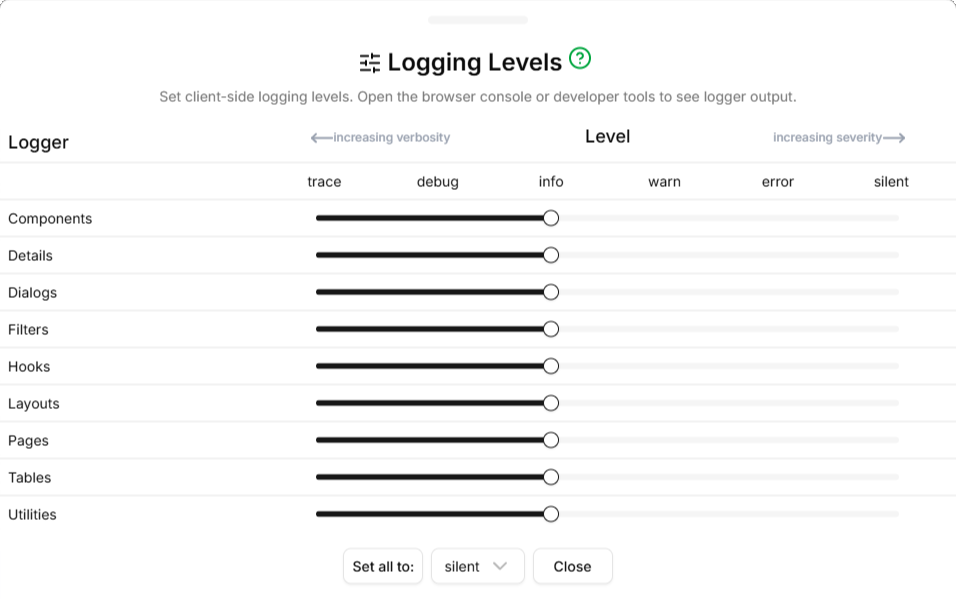
The Logging Levels dialog provides the means to set various internal logging levels for diagnostic purposes. Most components of the system emit logging output as an aid to debugging and diagnostics. The Logging Levels dialog is activated by typing the Ctrl+Alt+L key combination and can be dismissed with the Escape key. To view the logging output, open the browser's console panel.
There are ten logger types:
- Components
- Used by React JSX application components
- Details
- Used by details sections of master-detail pages
- Dialogs
- Used by application dialogs
- Filters
- Used by table filter sections
- Hooks
- Used by React application hook code
- Layouts
- Used by Next.js App Router layout.tsx components
- Pages
- Used by Next.js App Router page.tsx components
- Tables
- Used by table-related application components
- Utilities
- Used by application-level utility code
Supported logging levels are:
- trace
- The most detailed output, typically includes variable values
- debug
- Debugging output, typically at function call level
- info
- Informational output; this is the default setting for all loggers
- warn
- Warnings about unexpected conditions encountered
- error
- Serious errors that may need attention by a software engineer
- silent
- Logging entirely suppressed