


Status / Link Manager Dialog
The Status / Link Manager dialog provides the means to manage record links and to publish records. It provides guidance on record quality and completeness, and enforces minimum criteria for publication readiness. The dialog header identifies the contextual record, the one currently selected in the table of the underlying page from which the dialog was opened. The dialog footer includes a statement of the record's current status and eligility for publication, along with a set of command buttons:
- Previous
- Shows the previous tab in the dialog
- Close
- Closes the dialog
- Publish
- Publishes the record, disabled if ineligible.
- Next
- Shows the next tab in the dialog
The dialog has three tabs: Field Audit, Link Audit and Link Manager, described in the paragraphs below.
Field Audit Tab
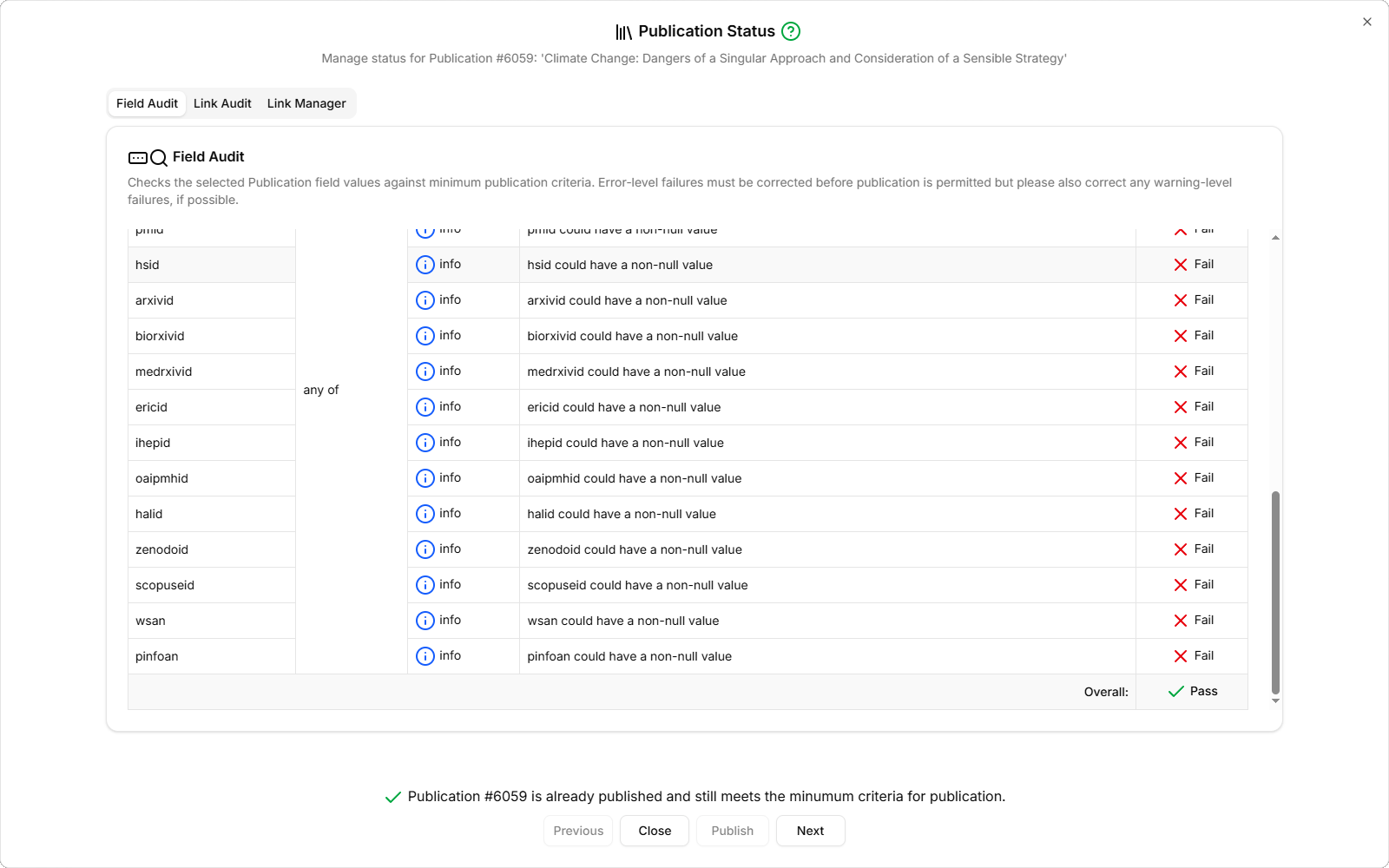
The Field Audit tab shows a table with the results of the Field Audit operation, which checks the record's field values against a set of rules and highlights any issues. The table has the following columns:
- Field Name
- The name of the field being checked
- Rule
- The rule kind: 'suggested', 'required' or 'any of'. 'Suggested' rules should be honoured if possible, whereas 'required' rules must be honoured. 'Any of' represents a sub-group of rules, at least one of which should pass.
- Severity
- The rule severity: 'info', 'warning' or 'error'. 'Info'-level rules are purely informational and 'warning'-level rules express a strong recommendation, whereas 'error'-level rules will prevent record publication if violated.
- Check
- A textual description of what the rule expects to find
- Result
- The result of the check: 'Pass' or 'Fail'.
The table footer shows the overall result across all rules. Note that only 'error'-level failures on 'required' rules cause an overall 'Fail' result, but in the interests of record completeness, consistency and overall quality, you should aim for as many 'Pass' results as possible.
Link Audit Tab
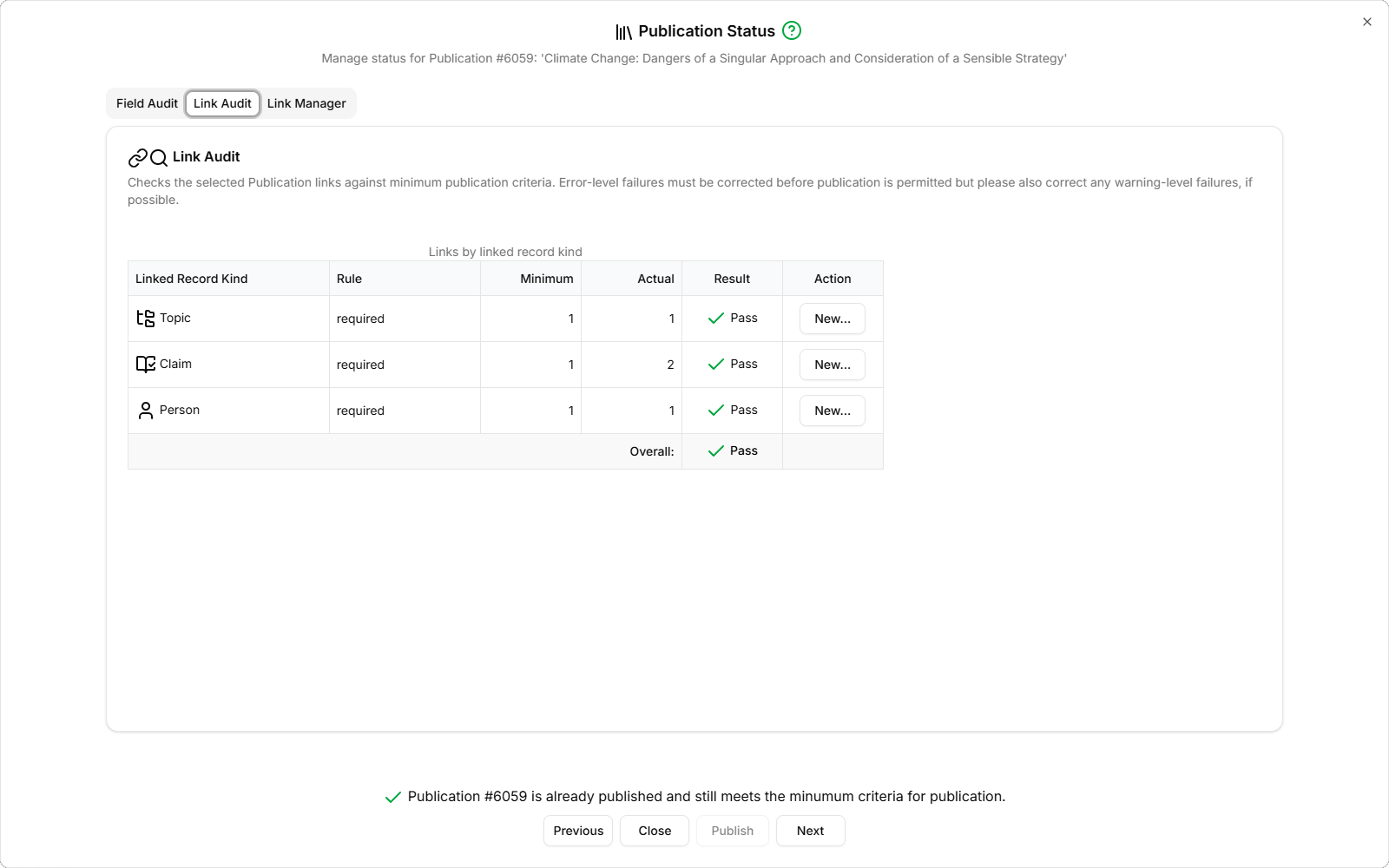
The Link Audit tab shows a table with the results of the Link Audit operation, which checks the record's links against a set of rules and highlights any issues. The table has the following columns:
- Linked Record Kind
- The kind of record to which the contextual record should have links
- Rule
- The rule kind: 'suggested', 'required' or 'any of'. 'Suggested' rules should be honoured if possible, whereas 'required' rules must be honoured. 'Any of' represents a sub-group of rules, at least one of which should pass.
- Minimum
- The minimum number of such links that must be present
- Actual
- The number of such links actually present
- Result
- The result of the check: 'Pass' or 'Fail'
- Action
- The 'New...' button activates the Link Manager tab with the Linked Record Kind selected, ready to create new links
Link Manager Tab
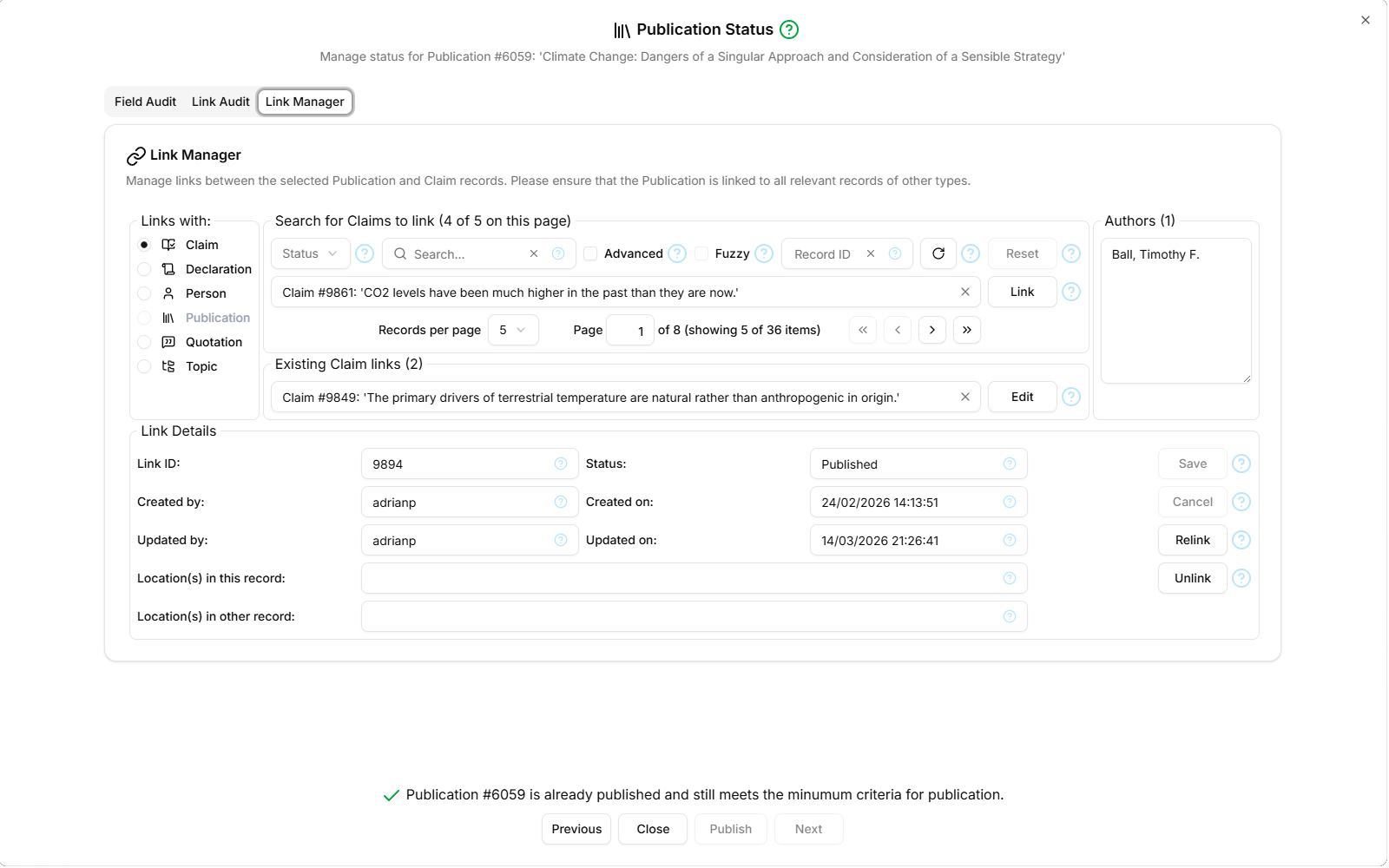
The Link Manager tab provides the means to manage the links associated with the contextual record. It has several field groups:
Links with
This field group contains a radio group showing the record types with which the contextual record can be linked. When a record type is selected (the 'other record type'), the 'Search for ... to link' and 'Existing ... links' sections refresh to show unlinked and already-linked records of the other record type.
Search for ... to link
This field group supports searching for as-yet unlinked records of the other record type. There is a filter section containing the standard Status, Search, Advanced, Record ID, Refresh and Clear controls as described here and additionally:
- Fuzzy
- Performs a fuzzy search. Guesses which other records might need linking to the contextual record based on the value(s) in some field of the contextual record and a corresponding field in the other record. The value of this contextual record's fuzzy-match field is displayed in 'Fuzzy match on' to the right. Only such 'fuzzily-matching' other records will be displayed. 'Authors' and 'Author' is one possible pairing of fuzzily-matchable fields.
Other records matching the filter criteria are displayed in a drop-down combobox, which is itself searchable. When such an 'other record' is selected, this enables the 'Link' command button to the right of the combobox, which allows you to create a new link between the contextual record and the other record. The 'other records' combobox is paginated, as described here. This is done to avoid the long delays that would otherwise result when no filter is active, causing all the other records to be fetched from the database (which could run into thousands).
Existing ... links
The 'Existing ... links' field group contains a drop-down combobox listing all the other records of the selected type that are already linked with the contextual record. The combobox is itself searchable to make it easier to locate a link of interest. When such an existing link is selected, its field values are displayed in the 'Link Details' field group, and also enables the 'Edit' command button to the right of the combobox. The Edit command makes the two 'Location(s) in ... record' inputs editable—see below.
Fuzzy match on
This field group is labelled according to the fuzzy match field in the contextual record type, and shows the value of that field. If appropriate, a word can be double-clicked to select it, then drag-dropped into the 'other records' combobox or even the filter's Search input.
Link Details
The 'Link Details' field group show the field values of the selected existing link. The fields are read-only unless creating a new record link or editing an existing one.
The Link Details field group contains the following command buttons:
- Save
- Saves pending changes to a new or existing record link
- Cancel
- Discards pending changes and reverts to read-only 'view' mode
- Relink
- Changes the record link to target a different other record selected in the 'other records' combobox. The 'Location(s) in other record' field, if set, should be amended accordingly (the existing value would likely not make sense applied to the new target record).
- Unlink
- Deletes the record link. Internally this just sets the record link's status to 'Deleted' so that it is no longer visible to unauthenticated users.