
Details Section
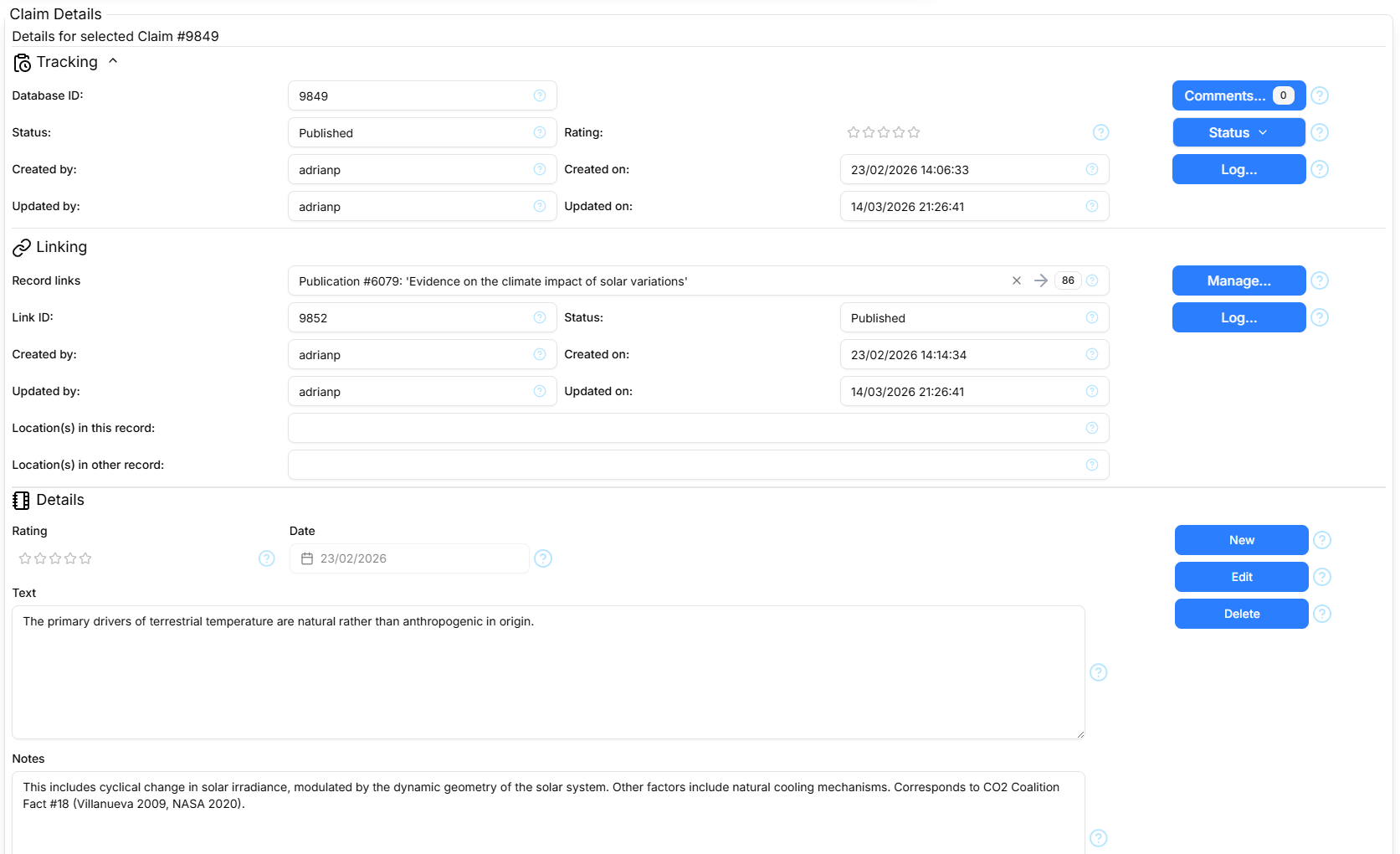
The Details section has three parts: a collapsible 'Tracking & Linking' section containing the Tracking and Linking parts, and a third part labelled Details.
Tracking
The Tracking section displays the following information. All fields are read-only and immutable.
- Database ID
- The record's unique system-assigned identifier.
- Status
- The record status: Draft, Published, Suspended or Deleted
- Rating
- The record quality rating: 1 - 5 stars or blank. Admittedly somewhat arbitrary and subjective, at least until we formalise a ranking algorithm.
- Created by
- The username of the User who created the record
- Created on
- The date/time when the record was created
- Updated by
- The username of the User who last updated the record
- Updated on
- The date/time when the record was last updated
Tracking Commands
The following command buttons are present:
- Comments
- Opens the Comments Dialog to show any comments associated with the record
- Status
- Presents a popup menu for changing the record Status
- Log
- Opens the Log Dialog to show the Log entries associated with the record
Linking
The Linking section displays information about Record Links involving the selected record. It is only displayed for Linkable records (Claims, Declarations, Persons, Publications, Quotations and Topics). It displays the following information:
- Record links
- A searchable drop-down list of other records linked with the contextual record. The right arrow takes you to the page containing the other record and the button refreshes the list from the database.
- Link ID
- The unique identifier of the record link.
- Status
- The status of the record link.
- Created by
- The username of the User who created the record link.
- Created on
- The date/time when the record link was created.
- Updated by
- The username of the User who last updated the record link.
- Location(s) in this record
- Location(s) within this record that pertain to the record link, e.g., page or chapter number.
- Location(s) in other record
- Location(s) within the other record that pertain to the record link, e.g., page or chapter number.
Linking Commands
The following command buttons are present:
- Manage
- Opens the Link Manager Dialog to manage the links associated with the record
- Log
- Opens the Log Dialog to show the Log entries associated with the record link
Details
All pages showing records include a form containing the record-type-specific fields. The form is used to display field values in read-only 'view' mode, and in 'edit' mode to create new records and edit existing ones. Some fields are constrained as to the kind of value they can accept, and while creating or editing show a red border and error message when their field valiation fails.
Form Commands
The following command buttons are present:
- New/Cancel
- Create a new record (view mode) OR discard pending changes (create/edit mode). Requires authentication and 'Create' authority.
- Edit/Save
- Edit the selected record (view mode) OR save pending changes (create/edit mode). Requires authentication and 'Update' authority.
- Delete
- Delete the selected record (view mode) OR disabled (create/edit mode). Requires authentication and 'Delete' authority.